I Built and Deployed a Next.js Site in 10 Minutes Without Writing a Single Line of Code
I Built and Deployed a Next.js Site in 10 Minutes Without Writing a Single Line of Code
I'm a developer. I know how to code. And I still didn't write a single line of it to ship this site — because in 2026, I didn't have to. Here's what happened when I tried to build a website with AI in 2026 without touching the keyboard for anything except describing what I wanted.
The Old Way Was Exhausting
Even for developers, spinning up a new site has always been a chore. Install dependencies. Configure the framework. Fight with your build tools. Google that one Tailwind class you can never remember. Push to GitHub. Connect Vercel. Debug the deploy.
For non-developers? It was basically a wall. You either learned to code, hired someone, or settled for a drag-and-drop website builder that looked like everyone else's.
None of those options were great.
So I Tried Something Different
I opened Code350 Workspace, created a new Next.js project, and typed this into the AI chat:
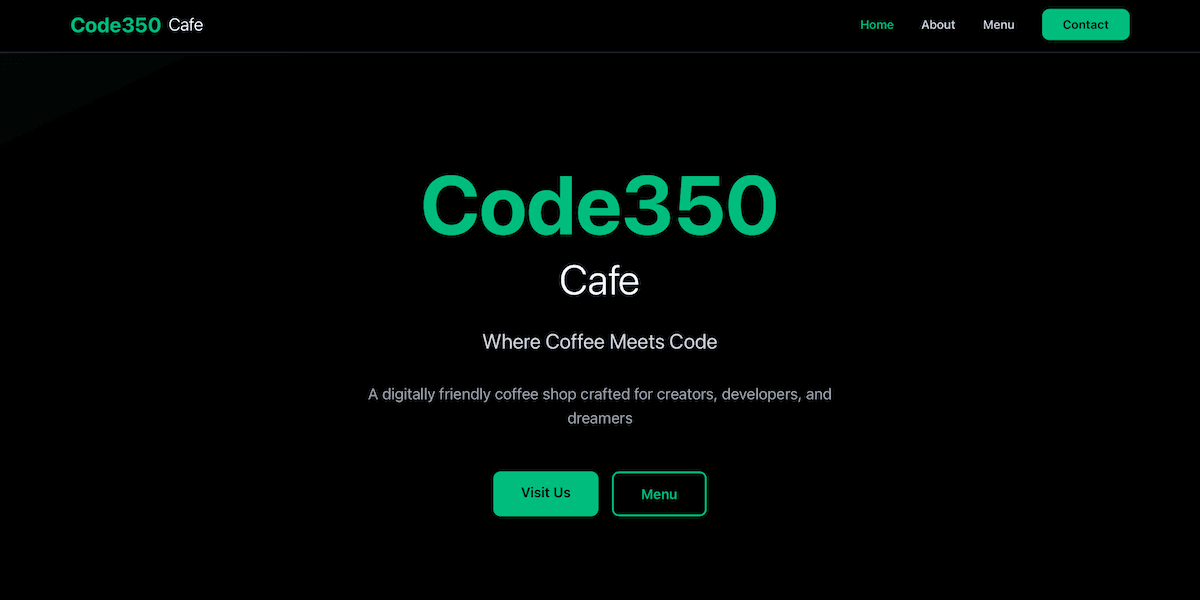
Build me a landing page for my digitally friendly coffee shop Code350 Cafe. Use black background, mostly white text, and Emerald for highlights and accents. We are open 6–6 Mon–Thur, 6–9pm Friday and Saturday, and 8–4pm Sunday.
Then I watched it build.
Not generate a template. Not drop in a theme. Actually write the code — components, styling, content, responsive layout — in real time, file by file, right in front of me.
In about two minutes I had a landing page. A real one. With a hero section, hours of operation, emerald accents, the whole thing. See it live at code350-cafe.vercel.app.
Then I Deployed It
This is the part that used to take the longest. Not anymore.
I connected my GitHub account in the workspace settings — one click, one authorization screen. Created a repository, went back to the AI chat and typed:
Push the code to GitHub
Done. Code was on GitHub in seconds.
Then I opened Vercel, imported the repo, clicked Deploy, and waited about 45 seconds.
Live URL. Real domain. Actual Next.js app running in production.
Total time start to finish: under 10 minutes.
This Isn't a Toy
I want to be clear about what got built here. This isn't a Squarespace page or a Wix template. It's a real Next.js application:
- Deployed on Vercel's global edge network
- Version controlled on GitHub
- Automatically redeployed every time I push new code
- Ready for a custom domain, environment variables, API routes — anything
The AI built it. But what it built is production grade. Go see it yourself: code350-cafe.vercel.app
What This Means for Everyone Else
If I can do this as a developer and save hours, imagine what this means for someone who can't code at all.
The coffee shop owner who wants a real website but can't afford an agency. The freelance photographer who needs a portfolio but doesn't know React. The tutor who wants to take bookings online but has no idea what Next.js even is.
They can all ship now. Today. In 10 minutes. That's what it means to build a website with AI in 2026 — not a mockup, not a prototype, the real thing.
Want to Build Yours?
That's just what building a website with AI in 2026 looks like — and the free course walks you through exactly what I did, step by step, from blank project to live deployed site. No coding experience required. No credit card. No setup.
Just you, an idea, and 10 minutes.
Free Resources from Code350
Start your learning journey with these completely free courses and resources. No hidden costs, just quality education.
Build & Deploy a Next.js Site in 10 Minutes
Build a business landing page in under 10 minutes from scratch with Next.js and deploy it live — no experience required.
Build Your First Component
Learn React fundamentals by building real components from scratch. Write JSX, pass props, manage state, and handle events — all inside the Code350 Workspace with AI tutoring that adapts to your pace.
All free courses include full access to video content, exercises, and AI-assisted learning.